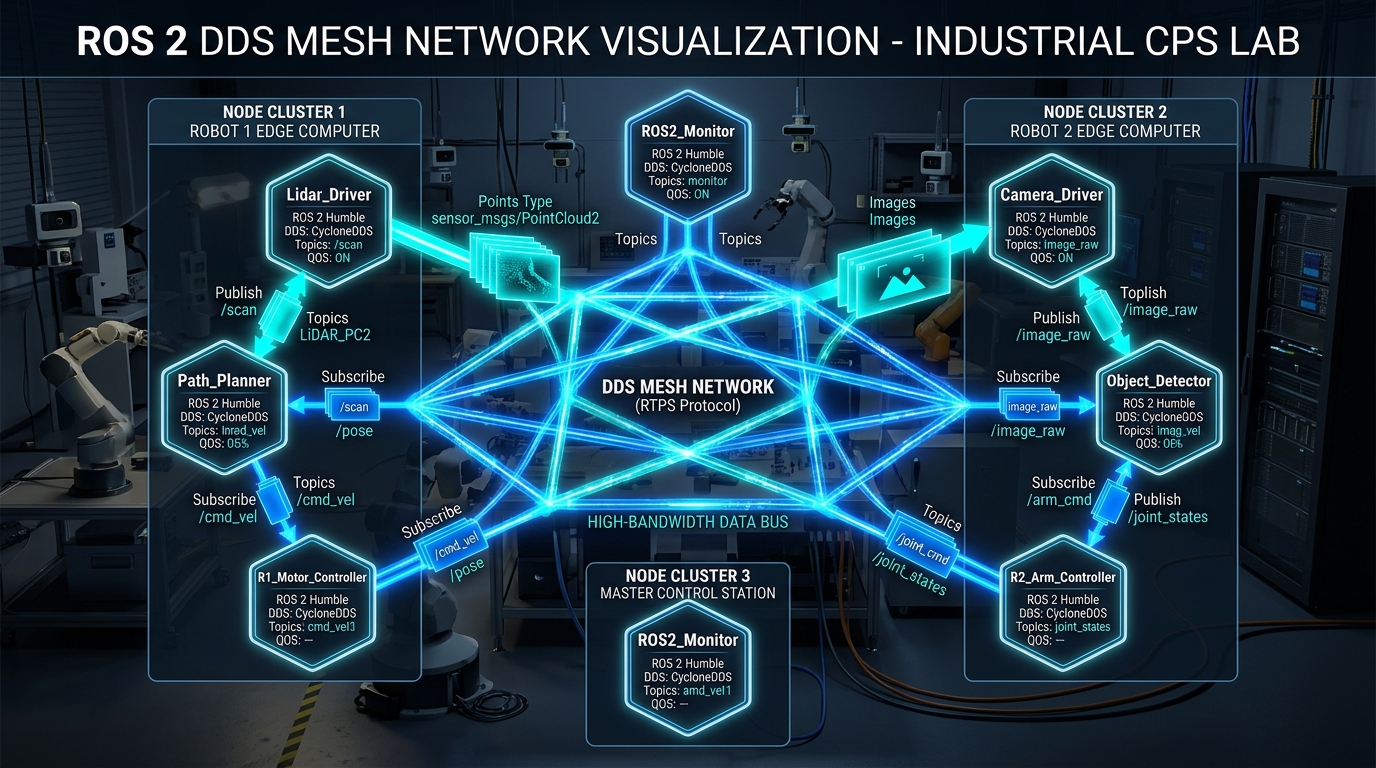
Core Engineering Takeaways
- •ROS 2 eliminated the single point of failure (roscore) by adopting the OMG Data Distribution Service (DDS) standard for decentralized peer-to-peer discovery.
- •Quality of Service (QoS) is an explicit contract: if a publisher offers "Best Effort" and a subscriber demands "Reliable", ROS 2 will refuse to connect them!
- •CycloneDDS is widely preferred for stable out-of-the-box local and multi-host performance, while FastDDS excels in custom discovery servers and enterprise XML configurations.
- •Transferring 60 FPS 4K camera frames or 20 Hz 3D LiDAR point clouds over standard DDS copies gigabytes of RAM; zero-copy shared memory (Iceoryx) bypasses the network stack entirely.
- •DDS multicast discovery floods enterprise WiFi routers with thousands of broadcast packets per second; production fleets must switch to Unicast Discovery Servers.
- ROS 2 node and topic pub/sub basics
- Computer networking fundamentals (IP, UDP, Subnets, Multicast)
- Linux network configuration and environment variables
1. Why DDS? The Flaws of ROS 1 roscore and Master Discovery
In ROS 1, communication relied on a centralized lookup service called roscore.
When roscore crashed, every node on the robot went blind. Moreover, ROS 1 used standard raw TCP/IP sockets:
- No fine-grained Quality of Service (QoS) tuning.
- If a sensor node published camera images faster than a subscriber could process them, TCP buffers backed up, causing multi-second pipeline lag.
- No built-in security, authentication, or encryption.
ROS 2 completely eliminated roscore. Instead, it built the ROS Client Library (rcl) on top of a standardized ROS Middleware Interface (RMW), which interfaces with enterprise-grade DDS (Data Distribution Service) implementations governed by the Object Management Group (OMG).
In DDS, every node automatically discovers all other nodes on the local subnet via decentralized multicast announcement packets.
Because DDS has no centralized broker or master daemon, two ROS 2 robots connected to the same switch will automatically detect each other and start sharing topics without any master IP configuration.
2. DDS Vendors Shootout: Eclipse CycloneDDS vs eProsima FastDDS
ROS 2 allows swapping the underlying DDS vendor at runtime by setting a single shell environment variable (export RMW_IMPLEMENTATION=...):
1. Eclipse CycloneDDS (rmw_cyclonedds_cpp)
- Written in pure C for extreme efficiency and low memory footprint.
- Outstanding predictable latency and minimal CPU overhead for small to medium robot systems.
- Default RMW in ROS 2 Galactic and widely favored by the research community for its simple XML configuration.
2. eProsima FastDDS (rmw_fastrtps_cpp)
- Written in modern C++ by eProsima, deeply supported by Open Robotics.
- Default RMW in ROS 2 Humble and Jazzy.
- Extensive support for custom Discovery Servers, Micro-ROS on microcontrollers, and zero-copy shared memory transports.
| Feature | Eclipse CycloneDDS | eProsima FastDDS | Recommendation |
|---|---|---|---|
| Codebase | Pure C (C99) | Modern C++ (C++14/17) | Cyclone for low-footprint MCUs / Linux |
| Default in ROS 2 | Galactic | Humble, Iron, Jazzy | FastDDS if using stock Ubuntu setup |
| Discovery Server Architecture | Supported (Via config) | Native Discovery Server CLI & Daemon | FastDDS for warehouse fleets with 20+ robots |
| Configuration Complexity | Simple cyclonedds.xml | Comprehensive fastdds.xml | Cyclone for simple debugging; FastDDS for fine tuning |
| Shared Memory Transport | via Eclipse Iceoryx integration | Built-in FastDDS SHM transport | FastDDS for zero-configuration local SHM |
3. Quality of Service (QoS): The Compatibility Request vs Offered (RxO) Contract
In ROS 1, all topics were identical. In ROS 2, every publisher and subscriber declares a Quality of Service (QoS) profile.
For a connection to succeed, the subscriber's Requested QoS must be compatible with the publisher's Offered QoS (RxO Contract):
- 1Reliability (Best Effort vs Reliable):
- Reliable: Publisher re-transmits lost packets until acknowledged (crucial for goal poses, commands, and maps).
- Best Effort: Drops lost packets without re-transmission (essential for high-frequency 60 Hz LiDAR scans and video).
- *Rule*: A Reliable subscriber cannot subscribe to a Best Effort publisher!
- 2Durability (Volatile vs Transient Local):
- Volatile: Nodes only receive messages published after they connect.
- Transient Local ("Latched"): The publisher stores the last message in memory and immediately delivers it to late-joining subscribers (essential for static maps
/map).
- 3History & Depth:
- Keep Last (Depth N): Keeps up to messages in the buffer before overwriting oldest.
- Keep All: Buffers every message until memory runs out.
QoS Compatibility Rule (RxO Contract)
4. Zero-Copy Shared Memory IPC: Loaned Messages with Eclipse Iceoryx
Standard ROS 2 message transport has severe overhead on large payloads. When a node publishes a 1920×1080 3-channel RGB image (6.2 MB per frame):
- 1The driver serializes the C++ struct.
- 2The middleware copies the payload into the DDS send buffer.
- 3The kernel copies the buffer across loopback UDP sockets.
- 4The subscriber copies and deserializes the payload into its own callback.
At 60 FPS, this burns 1.5 GB/s of RAM bandwidth and consumes 80% of your CPU!
Loaned Messages & Shared Memory (SHM)
With Eclipse Iceoryx and ROS 2 Loaned Messages:
- The publisher requests a pointer to shared memory:
auto msg = pub->borrow_loaned_message(); - The publisher populates camera pixels directly into shared memory.
- When published, only a 64-bit memory pointer is passed to subscribers!
- Result: 0 CPU memory copies and message passing latencies under 50 microseconds.
#include <rclcpp/rclcpp.hpp>
#include <sensor_msgs/msg/image.hpp>

class ZeroCopyCameraNode : public rclcpp::Node {
public:
  ZeroCopyCameraNode() : Node("zero_copy_camera") {
    // Publisher configured for loaned messages
    pub_ = this->create_publisher<sensor_msgs::msg::Image>("camera/image_raw", 10);
    timer_ = this->create_wall_timer(std::chrono::milliseconds(33), [this]() {
      // 1. Borrow pre-allocated shared memory buffer directly from Iceoryx
      auto loaned_msg = pub_->borrow_loaned_message();
      if (!loaned_msg.is_valid()) {
        RCLCPP_WARN(this->get_logger(), "Failed to loan message buffer!");
        return;
      }

      // 2. Populate sensor data directly into shared memory pointer (Zero Copy!)
      sensor_msgs::msg::Image & msg = loaned_msg.get();
      msg.header.stamp = this->now();
      msg.width = 1920;
      msg.height = 1080;
      msg.encoding = "bgr8";
      msg.step = 1920 * 3;
      msg.data.resize(1920 * 1080 * 3); // Directly mapped to SHM

      // 3. Publish transfers only the 64-bit pointer across IPC
      pub_->publish(std::move(loaned_msg));
    });
  }
private:
  rclcpp::Publisher<sensor_msgs::msg::Image>::SharedPtr pub_;
  rclcpp::TimerBase::SharedPtr timer_;
};
Note: ROS 2 C++ node demonstrating the Loaned Messages API. Bypasses serialization and socket copies by writing camera data directly into shared memory.
5. Taming the WiFi Storm: Multicast Pitfalls & DDS Discovery Servers
By default, DDS relies on Simple Discovery Protocol (SDP), using UDP multicast (239.255.0.1). Every node periodically blasts discovery packets across the entire network.
On physical Ethernet switches, this works fine. But on industrial WiFi:
- WiFi access points handle multicast poorly: they transmit multicast at the lowest base data rate (e.g. 1 Mbps) to ensure all distant clients receive it.
- When 20 robots with 40 nodes each operate on a warehouse floor, millions of discovery packets saturate the WiFi spectrum, causing 40% packet drops and disconnecting robot teleoperation.
Solution: FastDDS Discovery Server
Replace multicast with a centralized, lightweight DDS Discovery Server:
- A single daemon runs on an access point or edge server (
fastdds discovery --port 11811). - Robots send unicast TCP/UDP packets directly to the server IP.
- Multicast discovery traffic drops from 10,000 packets/sec to zero!
Never deploy more than 3 mobile robots on a shared WiFi network using default multicast DDS discovery. Always configure a Discovery Server or CycloneDDS unicast peer list.
6. Multi-Robot Fleet Management: ROS_DOMAIN_ID & Network Segmentation
If two engineers in the same lab run their robots on the default configuration, Robot A will subscribe to Robot B's /cmd_vel topic, causing robots to drive each other!
ROS_DOMAIN_ID Partitioning
DDS isolates traffic using Domain IDs (from 0 to 101): ``bash export ROS_DOMAIN_ID=42 `` Nodes with different Domain IDs use completely different UDP port ranges and cannot see or interfere with each other:
For commercial multi-robot fleets sharing a single warehouse fleet management system (FMS), use Zenoh or a ROS 2 Topic Gateway / Zenoh Bridge to bridge only high-level status and goal topics across the fleet while keeping low-level sensor topics isolated within each vehicle.
| Environment | RMW Choice | Discovery Mode | QoS Configuration | Special Architecture |
|---|---|---|---|---|
| Single Robot Development | CycloneDDS or FastDDS | Default Multicast | Default SensorData QoS | Standard loopback IPC |
| High-Rate Cameras / Point Clouds | FastDDS (SHM) or Cyclone (Iceoryx) | Local Shared Memory | KeepLast(1), BestEffort | Loaned Messages API |
| Multi-Robot Lab (Shared WiFi) | CycloneDDS | Unique ROS_DOMAIN_ID per student | Default | Prevent accidental cross-talk |
| Commercial Fleet (50+ AMRs in Warehouse) | FastDDS | Unicast Discovery Server | TransientLocal for maps, BestEffort for LiDAR | Zenoh Bridge to Fleet Management System |
Common Questions & Troubleshooting
Q:Why does "ros2 topic echo" show nothing even though "ros2 topic list" shows the topic?
This is almost always a Quality of Service (QoS) mismatch! If the publisher publishes with "Best Effort" reliability (typical for LiDAR and cameras) and your subscriber uses the default "Reliable" profile, DDS refuses to connect them without printing an error. Fix this by passing the sensor data QoS profile: "ros2 topic echo --qos-reliability best_effort /my_topic".
Q:How do I permanently switch my ROS 2 RMW implementation to CycloneDDS?
First install the package: "sudo apt install ros-humble-rmw-cyclonedds-cpp". Then add this line to your ~/.bashrc file: "export RMW_IMPLEMENTATION=rmw_cyclonedds_cpp". Run "source ~/.bashrc" to activate.
Q:What is Zenoh and why is it replacing DDS in high-scale robotics fleets?
Eclipse Zenoh is a modern lightweight protocol designed specifically for edge-to-cloud robotics. DDS has high protocol overhead (64-byte headers) and struggles over lossy cellular (4G/5G) and satellite links. Zenoh has ultra-minimal 4-byte headers, native routing brokers, and automatically bridges ROS 2 topics to remote web dashboards and cloud fleets.